The Electronic Official Personnel Folder (eOPF) is a central system for over a million federal employees, providing access to personnel documents, employment records, and benefits. In 2022, our team was tasked with modernizing this decades-old platform into a scalable, user-friendly system that reduced errors and increased efficiency. I played a key role in early product design and UX research, shaping the platform's structure, navigation, and foundational UI that guided the final redesign.
Context
Problem
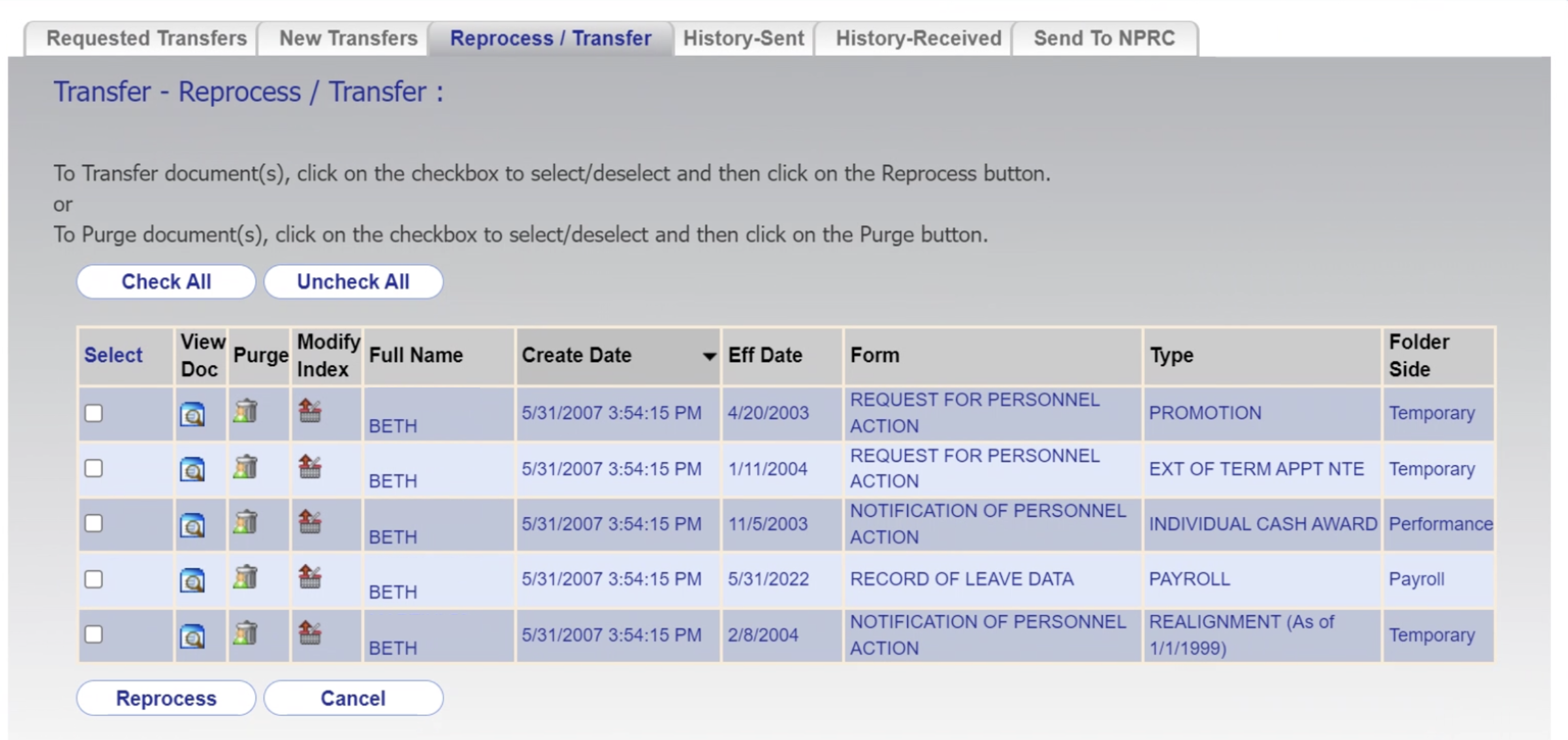
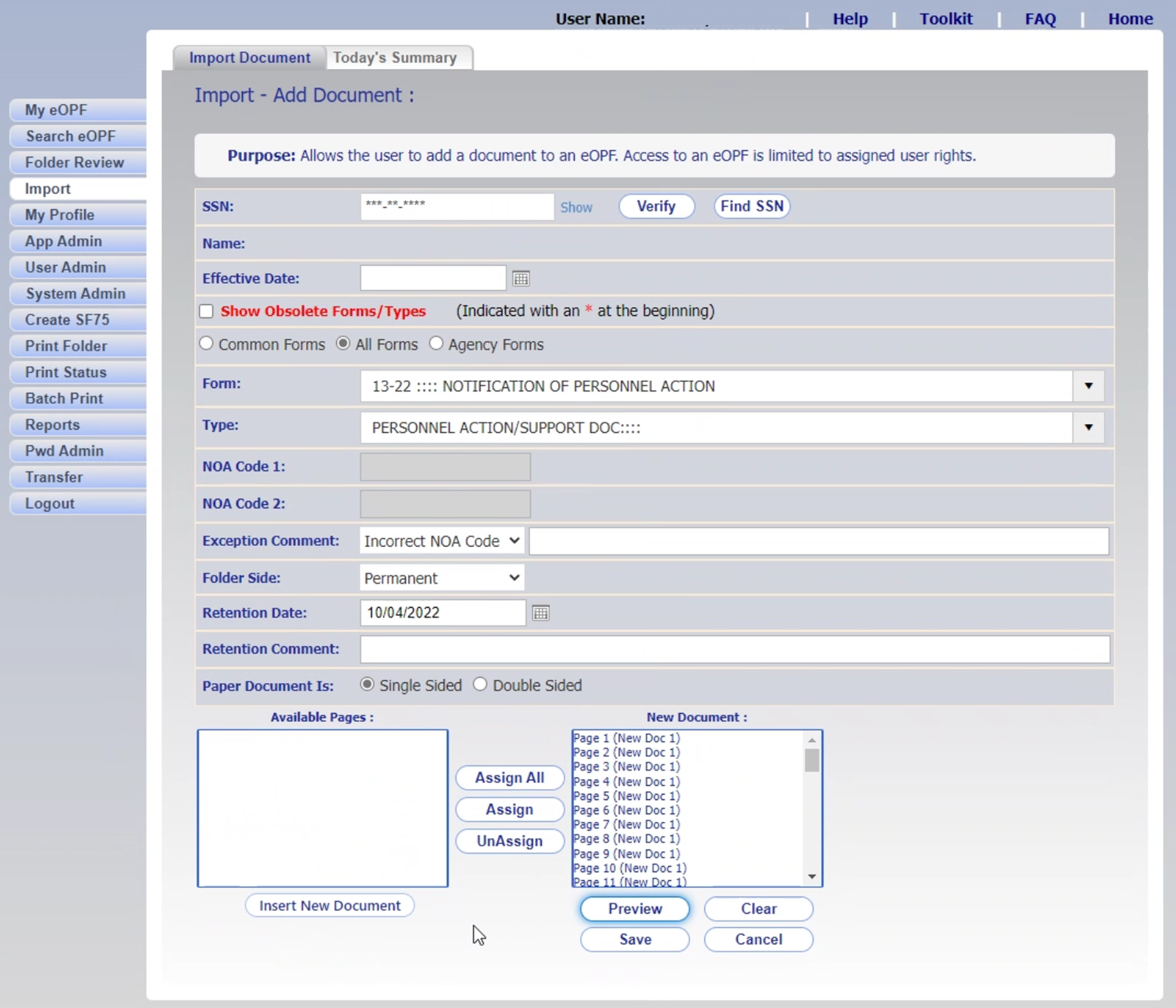
The legacy eOPF system was outdated, fragmented, and difficult to navigate. Employees often struggled to locate critical records, while HR specialists relied on manual workarounds to complete essential processes like document management and transfers. The system's poor usability eroded trust and efficiency, creating risks during high-stakes moments such as job changes, benefits updates, and retirements.
Goal
A modern, secure records system that simplifies high-stakes HR workflows and rebuilds trust in how federal employees and HR specialists manage personnel data.
The goal was to reduce complexity and technical risk in the legacy eOPF platform by clarifying workflows, surfacing essential actions, and aligning with modern usability and accessibility standards.
Constraints
- Comply with strict federal security protocols and permission models
- Protect data integrity — even minor document loss would be critical
- Support complex, policy-driven workflows
- Meet WCAG accessibility standards
- Integrate with existing technical infrastructure and legacy systems
Research
Early Discovery Research
To align our work with user needs and business goals, I reviewed prior research conducted by OPM's internal research team, the LAB at OPM — including the Federal Employee CX Report, user personas, and interview summaries. These provided a foundation for understanding widespread usability and process issues across the platform.
Transfer Process Research
One of the highest stakeholder priorities was improving the employee transfer process — a critical yet error-prone workflow. To guide design, I conducted in-depth research to capture the experience from both employee and HR perspectives.
My role:
- Conducted interviews with federal employees and HR specialists at both gaining and losing agencies
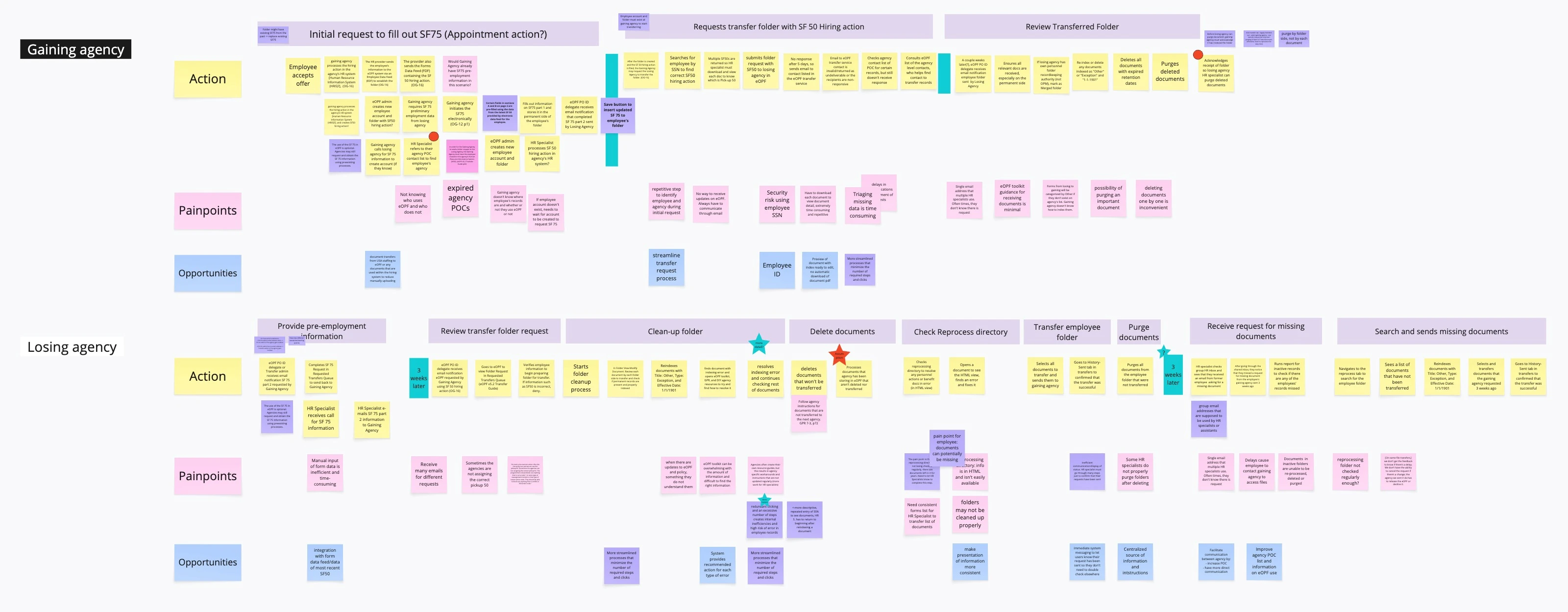
- Mapped the end-to-end transfer journey, highlighting responsibilities and pain points
- Facilitated process mapping with SMEs to capture complexity and undocumented workarounds
- Performed a gap analysis comparing the current experience with an ideal streamlined version
Key Findings
Inefficient manual processes
Redundant steps and outdated workflows force users to take extra actions that feel avoidable. Impact: Wasted time, inconsistent results, and high cognitive load.
No status tracking
Lack of visibility into request status and unclear accountability. Impact: Anxiety, repeated follow-ups, and unnecessary rework.
Lack of in-app guidance
Users don't know how to use the system or whether they are using it correctly. Impact: Reliance on external support, more errors, and missed deadlines.
Missing or incomplete records
Documents are sometimes lost or never submitted due to unclear processes or fragile handoffs. Impact: Pay or benefit disruptions and data recovery efforts.
Difficult UI
Cluttered screens, confusing navigation menus, and poor visual hierarchy make it hard to locate documents or complete tasks. Impact: Frustration, frequent errors, and reliance on external help or trial-and-error.
Opportunity Areas
We synthesized our findings into eight opportunity areas that guided design decisions across the platform:
Visibility
Surface status, progress, and accountability
Timely notifications
Ensure urgent actions aren't missed
Guidance
Help users succeed without external support
Data integrity
Prevent document loss and fragile handoffs
Workflow simplification
Cut redundant and manual steps
Automation
Handle repetitive tasks consistently
Validation
Reduce errors with review before submission
Security
Protect sensitive personnel data
Design
Laying the foundation
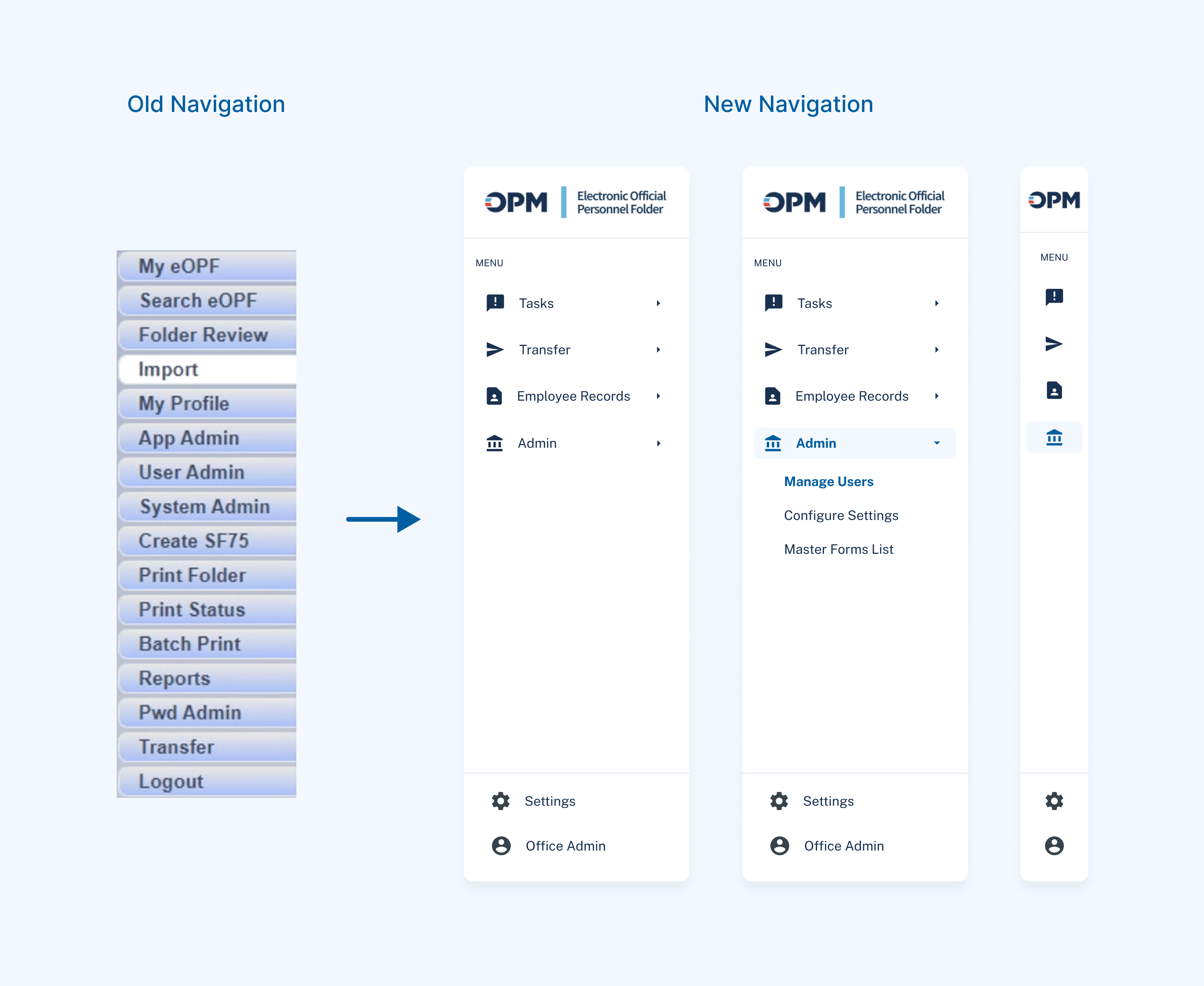
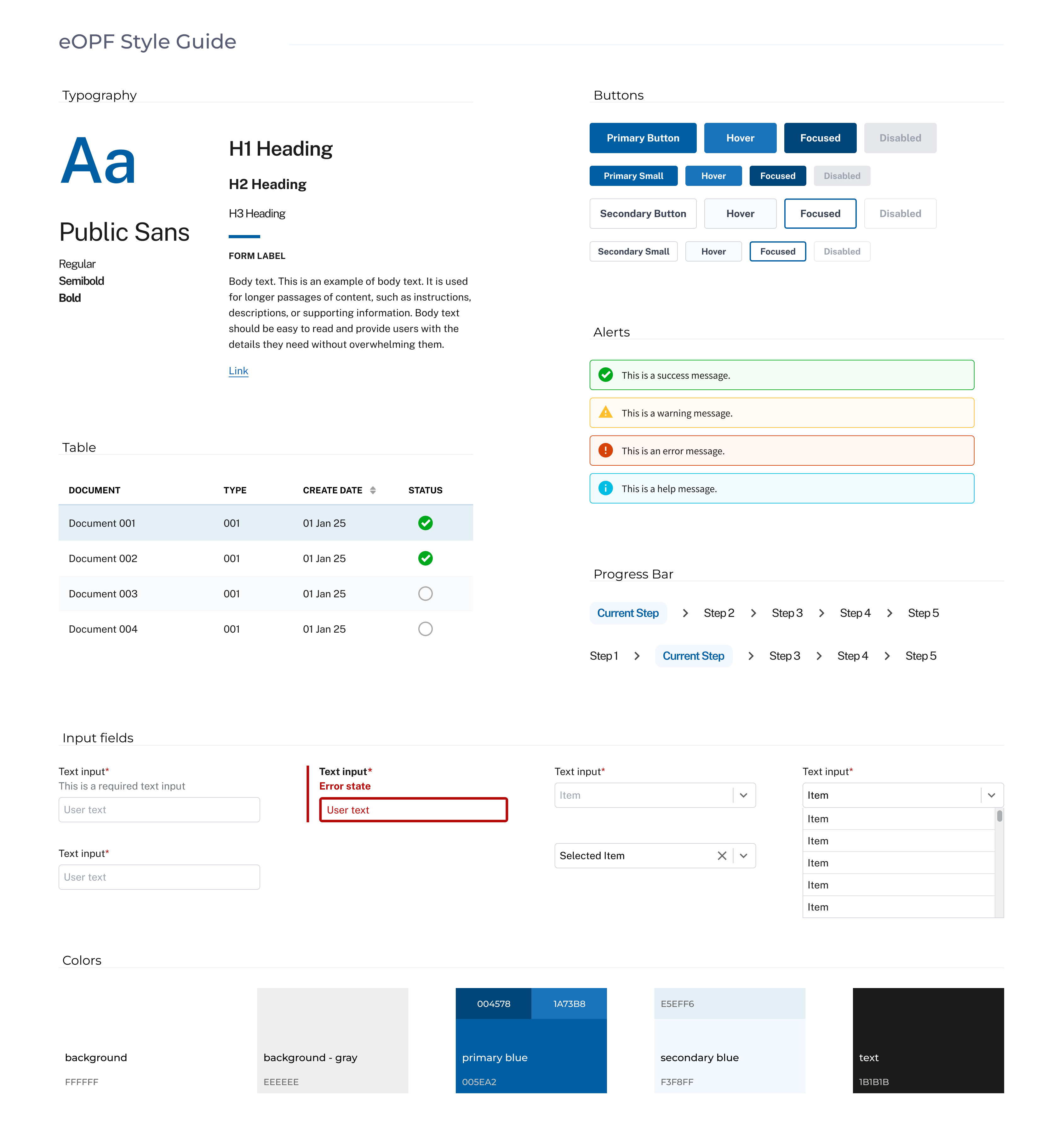
To support both federal employees and HR specialists, I led efforts to define the information architecture, navigation model, and foundational UI patterns, adapting the U.S. Web Design System (USWDS) with custom extensions.
Key contributions:
- Navigation design: Clarified content hierarchy with a sitemap and simplified access to documents, benefits, and transfer tasks.
- Page layouts: Established consistent templates for core workflows.
- Style guide: Adapted USWDS patterns with custom extensions for typography, colors, and design components.
Deep Dive — Redesigning the Federal Transfer Experience
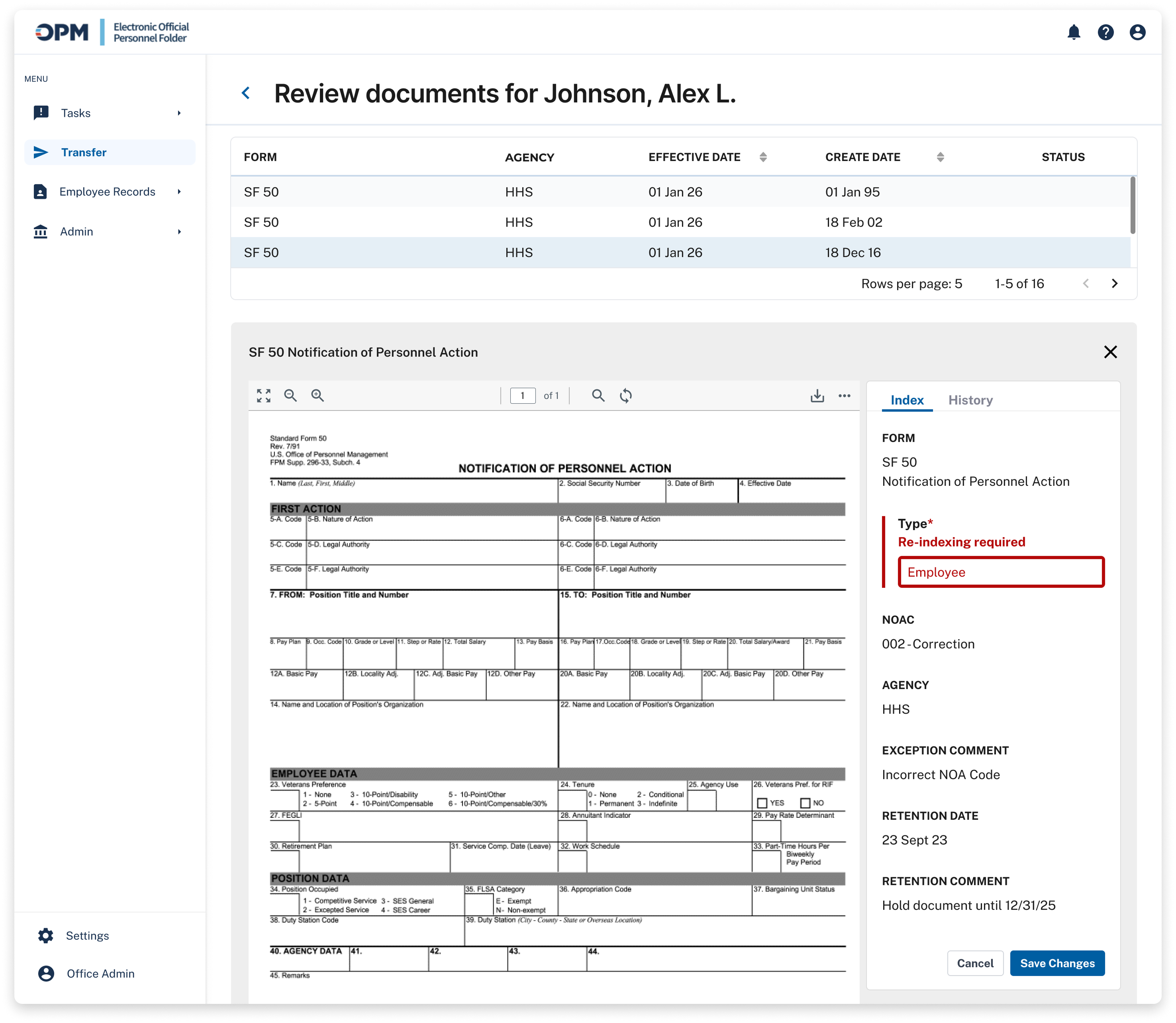
The federal employee transfer process was one of the most fragile and high-risk workflows in the legacy system. Errors here could delay job changes, disrupt benefits, or result in lost records — yet the experience remained fragmented, manual, and hard to track.
I focused on redesigning this workflow to support secure data handoffs, clearer ownership, and end-to-end visibility for both HR specialists and employees.
Guidance
Clear instructions on the page to help HR Specialists understand the task at hand
Validation
Confirming employee information before transfer prevents errors and avoids repeat work

Workflow simplification
Documents can be previewed and re-indexed directly in the system, reducing extra steps
Validation
System flags incorrect indexing and requires re-indexing to ensure accuracy
Data integrity
Preview panel shows metadata and history, helping ensure each document is complete and accurately indexed

Visibility
A progress tracker gives users a clear sense of where they are in the transfer process
Notification
System alerts keep users informed at key moments, ensuring smooth progress through the transfer
Outcomes
Delivered where multiple previous attempts failed — transforming abstract vision into operational reality for millions of federal employees.
442M
Files migrated to the new platform
200GB
Daily document traffic handled by the system
5M+
Federal employees served
16K+
Daily active users
The work I contributed during the early stage of the development became foundational to the eOPF platform that launched in 2025. Early feedback highlighted major improvements in document visibility, status tracking, and transfer transparency.
Business & strategic impact
- Improved workflow efficiency through digitization and automation
- Decreased data-entry errors and correction loops
- Enabled clearer reporting and case tracking
Platform-wide improvements
- Simplified navigation reduced steps to locate documents and complete tasks
- Content-first layouts and in-app guidance supported self-service
- Bulk actions reduced repetitive tasks
Transfer workflow improvements
- Improved transparency and reduced manual follow-ups
- Reduced common document errors
- Streamlined task completion
Organizational influence
- Helped communicate design direction and system complexity across teams
- Opportunity areas shaped product prioritization
- Established the visual and structural foundation for the entire system
Reflection
What I learned
- Drive clarity and focus in ambiguous, shifting product environments.
- Communicate product direction effectively across design, dev, and business stakeholders.
- Balance user needs with policy, technical, and timeline constraints.
- Translate messy ideas and feedback into actionable, prioritized product work.
- Maintain design integrity while adapting to evolving organizational needs.
This was one of the most meaningful and complex projects I've worked on — both in scale and in stakes. The scope was enormous, the team faced constant change, and stakeholder priorities shifted frequently. But navigating those challenges made the work even more impactful.
Though I wrapped up my work before the eOPF redesign went live, I closely followed the public rollout — including Reddit discussions where federal employees shared their reactions, rumors, and relief.
Before launch — misinformation spreads
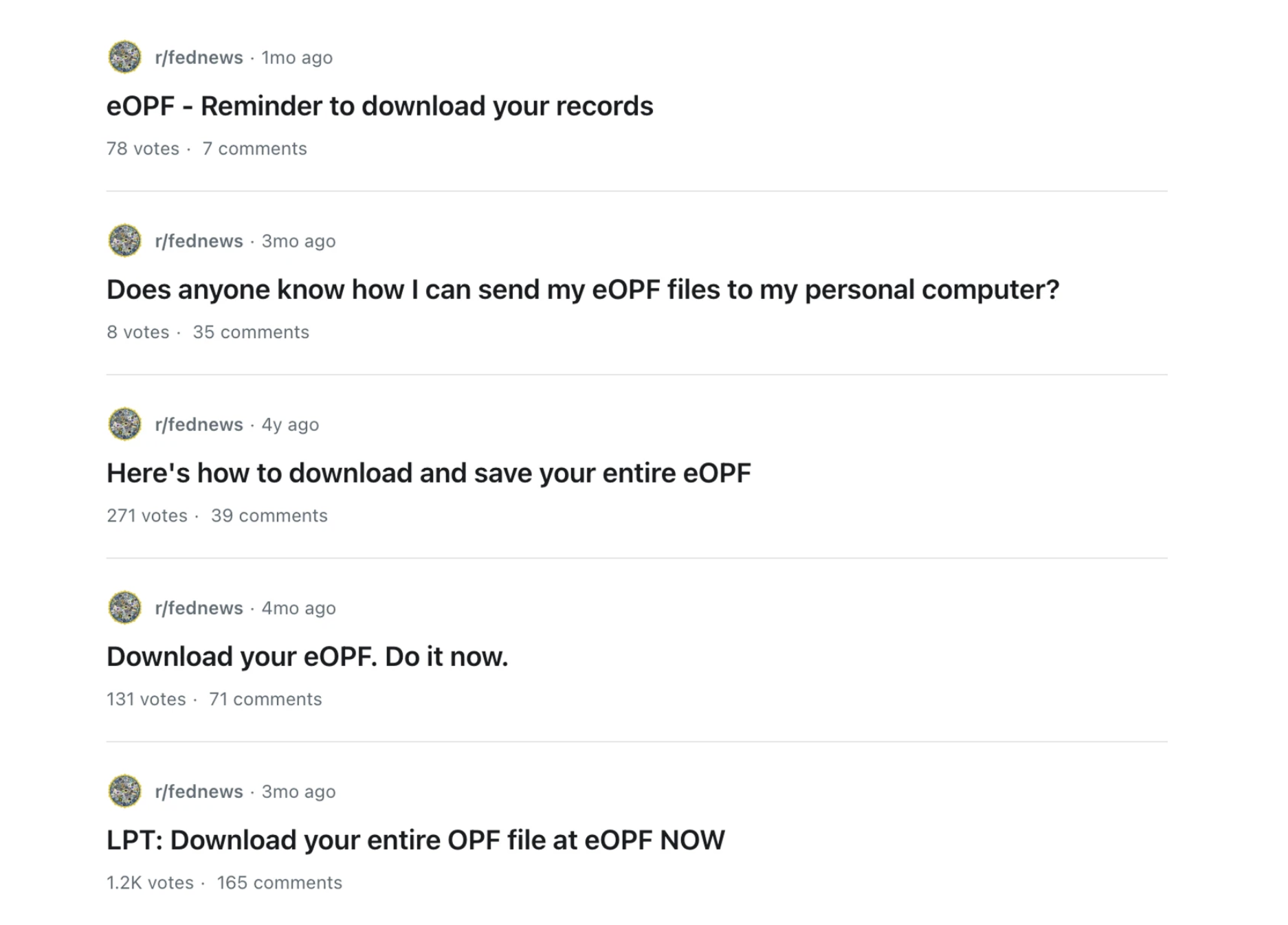
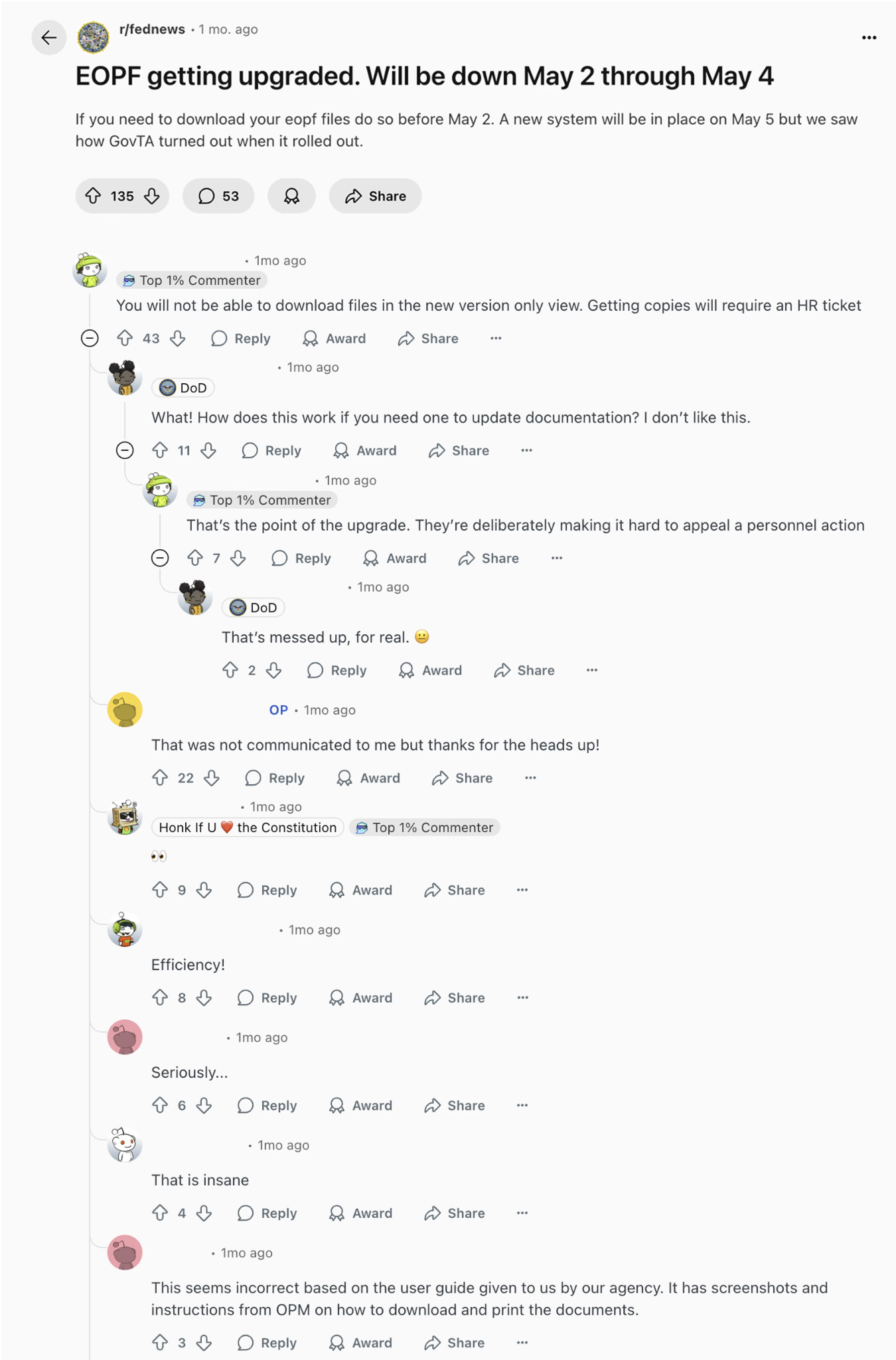
In the weeks leading up to launch, misinformation spread quickly. A user mistakenly claimed the new system wouldn't allow file downloads, contributing to confusion and fear. Others urged each other to download their files before the redesign went live. These rumors revealed something deeper than confusion — a genuine lack of trust in the system, and how personally high the stakes felt for the people depending on it.
After launch — a mix of reactions
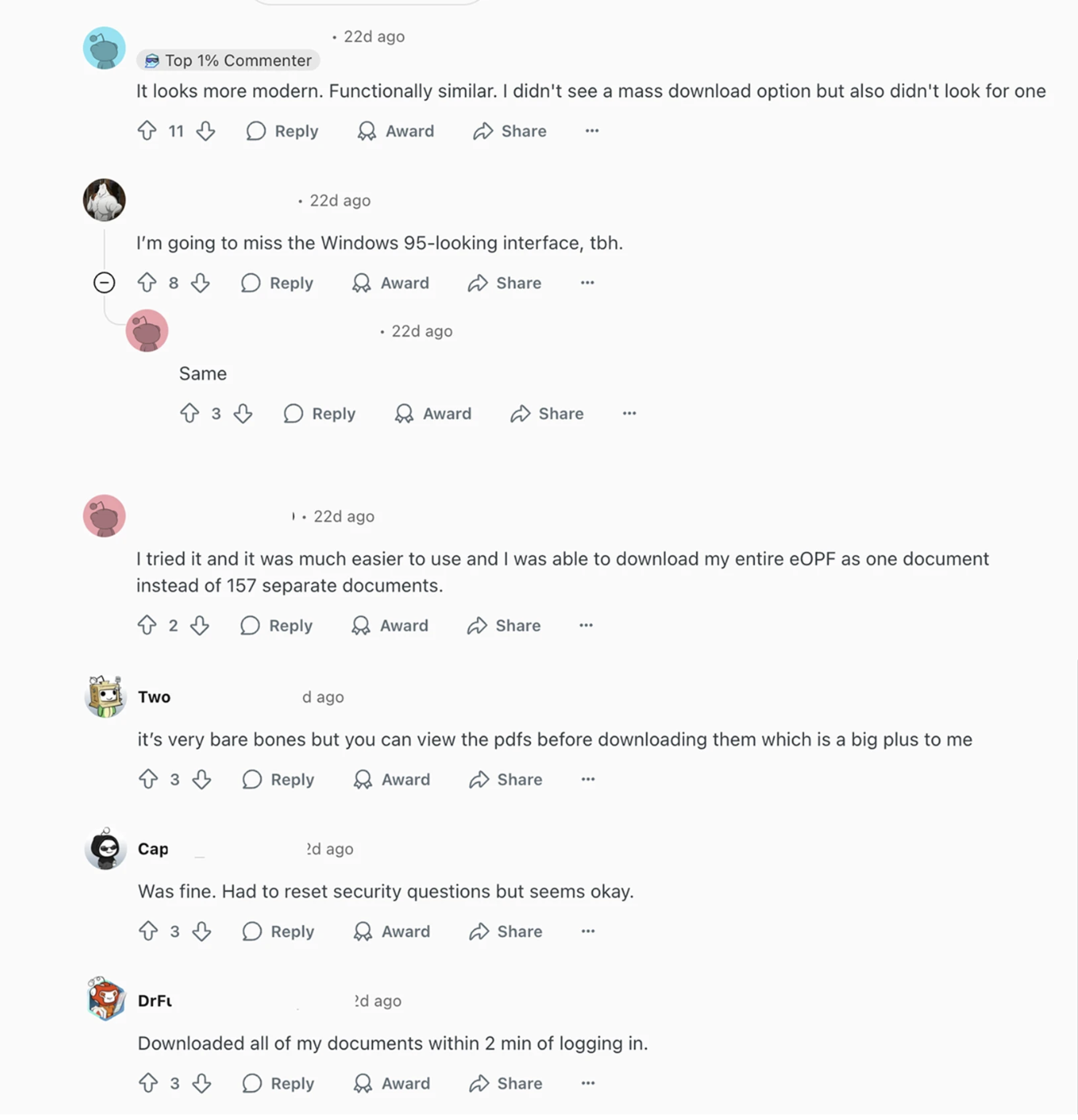
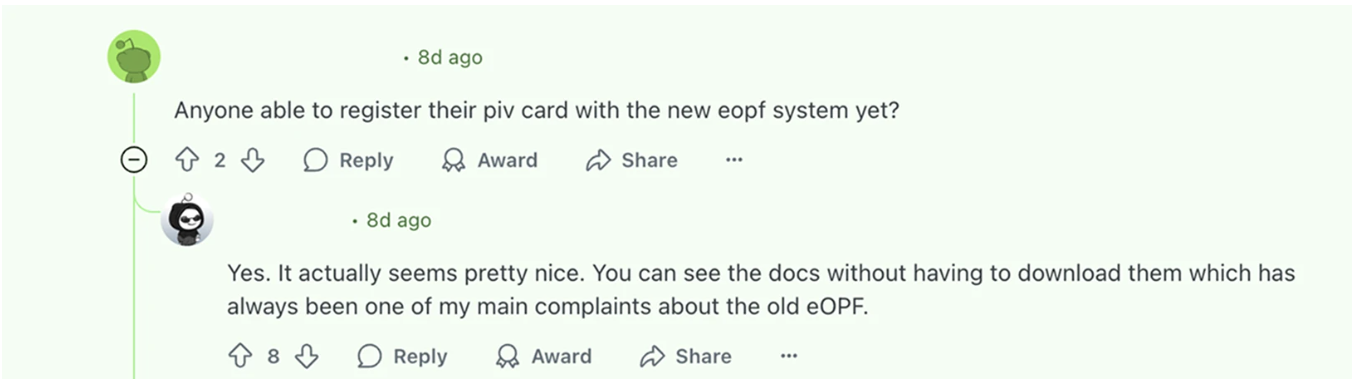
After launch, I saw a mix of reactions. Some users were relieved to find a cleaner interface, improved document access, and faster load times — noting that documents could now be previewed without downloading. Others were frustrated by limited functionality and lack of clear communication, especially those who weren't the system's primary audience (HR specialists). It was a reminder that even successful redesigns can fall short without thoughtful change management and proper onboarding.
If I were to continue…
If I stayed on the project, I would have focused on:
- Supporting user onboarding to help people adjust to the new system with confidence.
- Developing targeted communication plans to address concerns and prevent rumor-driven panic.
- Continuing to build out the employee-facing side of the platform — ensuring that trust, visibility, and utility extend beyond HR users.
These conversations — even the skeptical ones — underscored why this work mattered. When the system holds someone's entire work history, even a small change can feel monumental. And that's exactly the kind of high-impact, trust-sensitive product I want to keep designing.